
Spectro Team · April 20, 2026 · 6 min read
Best Spek Alternatives for Mac in 2026
Spek hasn't been updated since 2013. Here are the real alternatives for Mac users who need to analyze audio files and detect fake lossless tracks - including one that does it automatically.
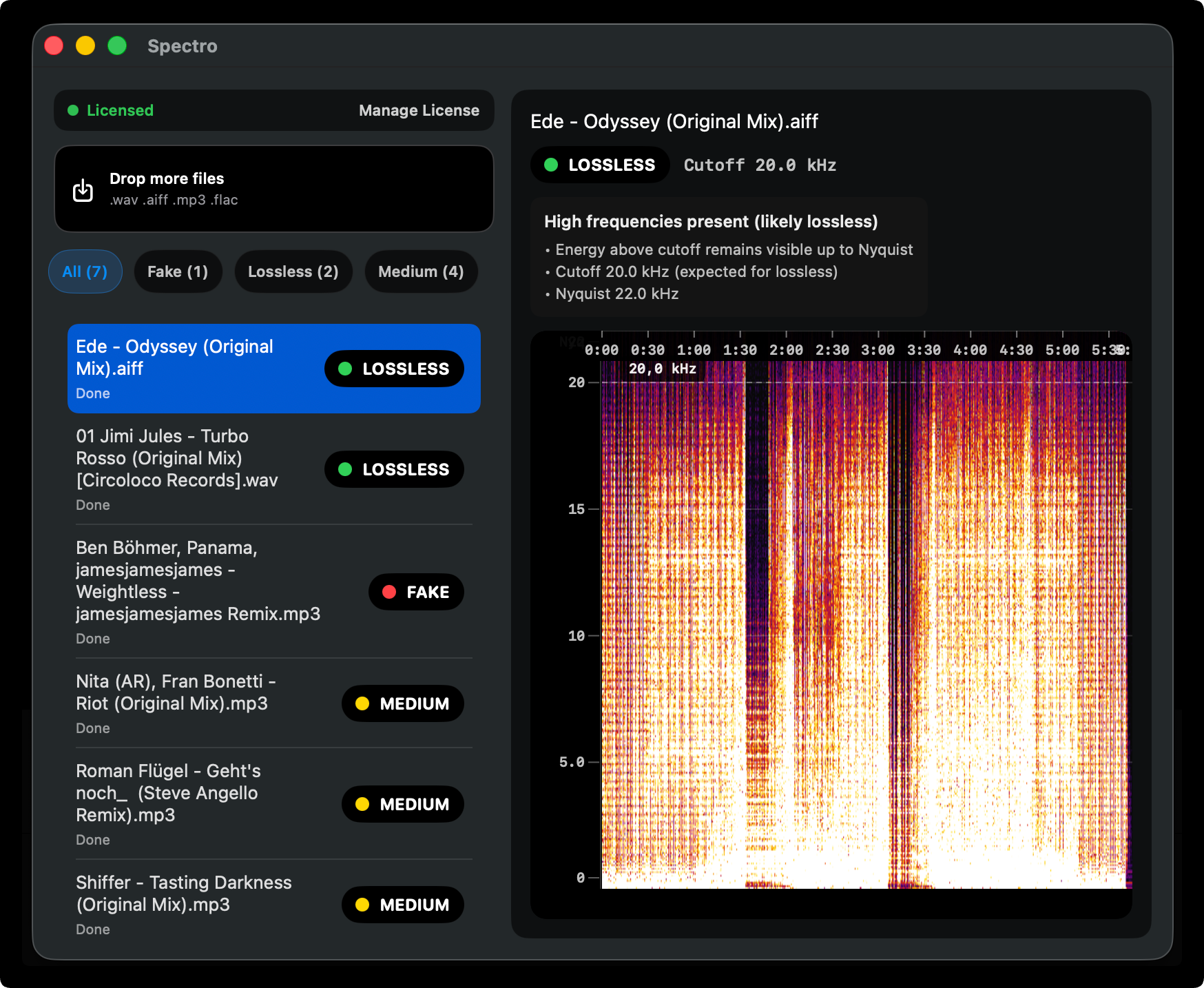
If you've tried to run Spek on a modern Mac lately, you already know the problem. The app was last updated in 2013. On Apple Silicon it either crashes, runs through Rosetta with degraded performance, or simply refuses to open. For a tool whose entire job is to show you a spectrogram, that's not good enough.
This guide covers the best Spek alternatives available today for macOS - what each one does well, where it falls short, and which one is worth your time depending on how you use it.
Why people are looking for Spek alternatives
Spek was, for a long time, the go-to tool for checking audio quality. Drop a file in, see the spectrogram, look for the frequency cutoff. Simple and effective.
The problem is the ecosystem moved on. macOS Ventura and Sonoma introduced stricter notarization requirements. Apple Silicon changed how apps are compiled and distributed. Spek, being an open-source project with no active maintainer, never adapted. A few forks exist on GitHub - spek-X, spek-alternative - but none offer an installer that just works without compiling from source.
The result: thousands of DJs, audiophiles, and music producers are looking for something that works today.
The tools worth considering
Spectro (macOS, $39 one-time)
Spectro is the most direct Spek replacement for Mac users who work with music libraries. It was built specifically to solve the fake lossless problem - files that are labeled as WAV, AIFF, or FLAC but were actually converted from MP3.
The key difference from Spek is that Spectro doesn't just show you the spectrogram and ask you to interpret it. It gives you a verdict: LOSSLESS, FAKE, or MEDIUM, based on where the frequency content actually ends.
Drag in a folder of 100 tracks and Spectro processes all of them, flags the fakes, and lets you filter by result. For DJs preparing for a gig, that's the workflow. No more opening files one by one in a spectrogram viewer and squinting at frequency cutoffs.
What it does well:
- Automatic verdict - no manual interpretation needed
- Batch processing for entire folders
- Native Apple Silicon build, notarized
- Fully offline - your files never leave your machine
- 10-file free trial, no account required
For a detailed comparison of Spectro against the browser-based alternative, see Spectro vs. Fabl.
What it doesn't do:
- It's not a general-purpose audio editor or analyzer. If you need to annotate audio, measure loudness, or do anything beyond quality detection, you'll want a different tool.
Best for: DJs and audiophiles who want to audit their library quickly, without learning to read spectrograms.
Sonic Visualiser (free, open-source)
Sonic Visualiser is a powerful, research-grade audio analysis tool maintained by the Centre for Digital Music at Queen Mary University of London. It runs natively on macOS and receives regular updates.
It can display spectrograms, waveforms, chromagrams, and a dozen other representations. If you need to analyze audio in depth - for music research, production, or education - this is the most capable free tool available.
The trade-off is complexity. To detect fake lossless files, you need to add the spectrogram layer, configure the frequency scale, zoom to the right range, and visually identify the cutoff. There's no verdict, no batch processing, no automation. For a library of 500 tracks, that means 500 manual inspections.
Best for: Music researchers, producers, and technically curious users who want deep analysis on individual files.
Lossless Audio Checker (free)
Lossless Audio Checker (LAC) is a utility that does exactly what the name says: it checks whether a FLAC or WAV file is truly lossless by detecting frequency cutoffs programmatically.
On Windows it has a GUI. On macOS it's command-line only - you run it from Terminal with the path to your file or folder. For non-technical users that's a dealbreaker. For those comfortable with Terminal, it's a solid free option.
Reliability has been mixed according to user reports. Some edge cases (high-bitrate MP3s converted to FLAC, certain mastering styles with natural high-frequency rolloff) can produce false positives or false negatives.
Best for: Technically comfortable macOS users who want a free command-line option and don't mind occasional edge cases.
Ocenaudio (free)
Ocenaudio is a cross-platform audio editor that includes spectrogram analysis. It's genuinely easy to use and runs well on macOS, including Apple Silicon.
For fake lossless detection it works similarly to Sonic Visualiser: open the file, view the spectrogram, check where the frequency content ends. No automation, no batch mode, no verdict. It's an audio editor first, analyzer second.
Best for: Users who already need an audio editor and want spectrogram analysis as an additional feature, not a primary use case.
Comparison table
| Tool | Platform | Verdict | Batch | Free | Apple Silicon |
|---|---|---|---|---|---|
| Spectro | macOS only | yes Automatic | yes Yes | 25 files | yes Native |
| Sonic Visualiser | Mac/Win/Linux | no Manual | no No | yes Free | yes Native |
| Ocenaudio | Mac/Win/Linux | no Manual | no No | yes Free | yes Native |
| Spek | Mac/Win/Linux | no Manual | no No | yes Free | no Broken |
Which one should you use?
If you're a DJ preparing music for a gig or auditing a library of hundreds of files: Spectro. The batch processing and automatic verdict are built for exactly that use case. The $39 one-time cost pays for itself the first time it catches a fake WAV that would have sounded terrible through a club system.
If you're a music researcher or producer who needs to analyze individual tracks in depth: Sonic Visualiser. It's free, actively maintained, and extremely capable.
If you're comfortable in Terminal and want a free batch option: Lossless Audio Checker. Be aware of the macOS-specific limitations.
If you need an audio editor that also shows spectrograms: Ocenaudio.
Spek itself is no longer a practical option on modern Macs. The forks require compiling from source and are not notarized, which means macOS will block them by default.
The bottom line
The fake lossless problem hasn't gone away - if anything it's gotten worse as music libraries grow larger and files get passed between platforms and formats. The tools above are all genuine options depending on your needs. For most Mac users who care about audio quality, Spectro is the practical replacement for what Spek used to do, with the automation that Spek never had.
Related posts
Try Spectro free
25 files free. No account needed. Buy for $39 when you're ready.
Download Spectro — $39