
Spectro Team · April 27, 2026 · 7 min read
Why Your Lossless File Is Being Flagged as Fake (And When It's a False Positive)
Spectro flagged your lossless file as FAKE — but is it? Learn the four real cases where a genuine lossless file triggers a false positive and how to verify.
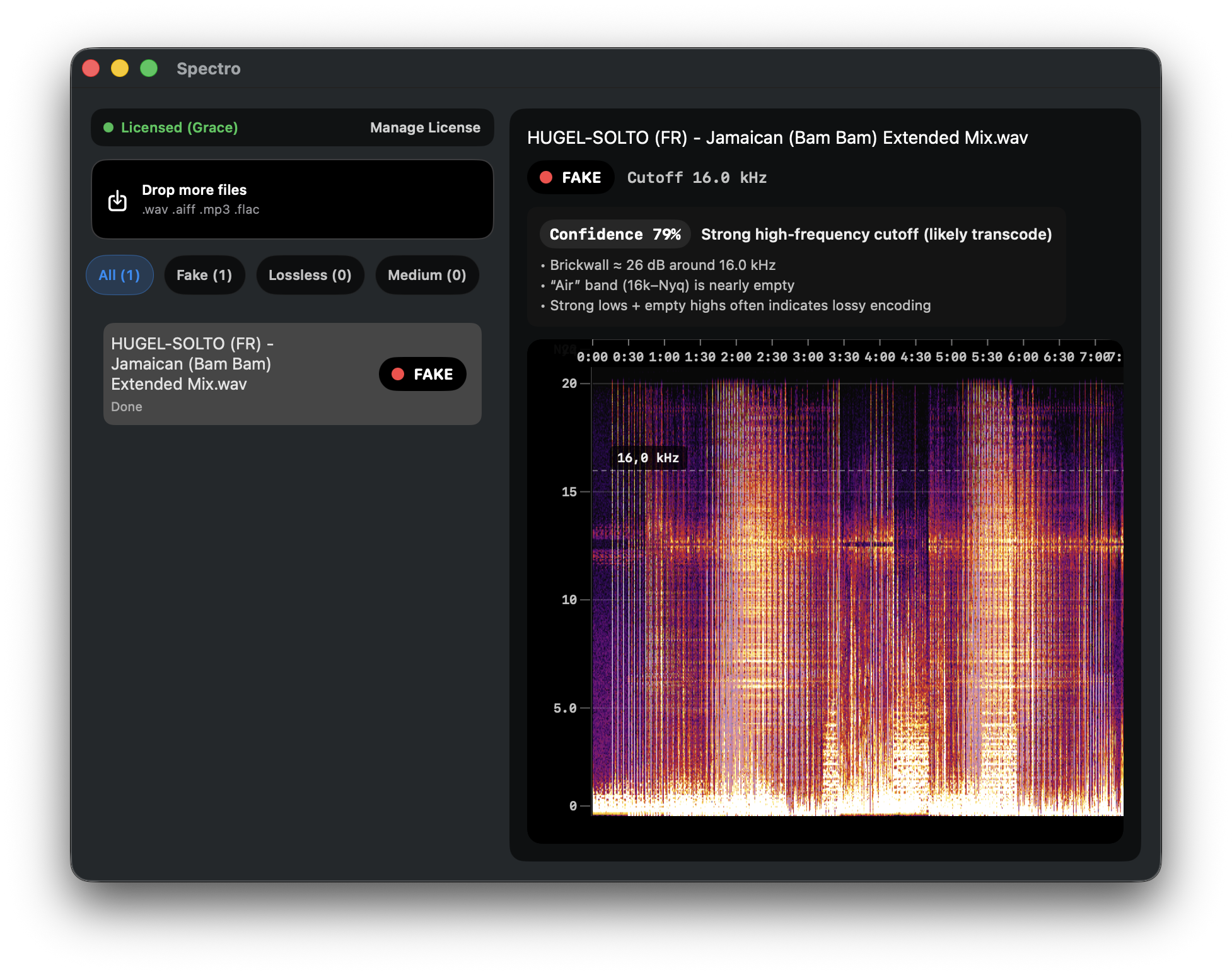
Most of the time, when Spectro flags a file as FAKE, it's right. A hard frequency cutoff at 16 kHz or 18 kHz is the unmistakable fingerprint of a file that started life as an MP3 and got re-wrapped in a WAV or FLAC container. But not always.
There are specific situations where a genuinely lossless file can produce a false positive — where the file is real lossless audio but the spectrogram shows a pattern that looks suspicious. Understanding these cases helps you know when to trust the flag and when to investigate further.
What "false positive" means here
A false positive is when Spectro (or any spectrum analyzer) returns a FAKE or MEDIUM verdict on a file that is actually lossless. The audio data was never compressed with a lossy codec — but something about how the file was recorded, mastered, or encoded makes the high-frequency content look truncated.
The four most common causes are: non-standard sample rates, vinyl rips, intentional high-cut mastering, and old recordings with limited bandwidth.
Files recorded at 32 kHz (the most common false positive)
This is the case most likely to confuse automated detection.
A standard lossless DJ download comes at 44.1 kHz or 48 kHz. At those sample rates, the Nyquist frequency — the highest frequency the file can contain — is 22.05 kHz and 24 kHz respectively. A genuine lossless file will show energy up to that limit.
A file recorded at 32 kHz has a Nyquist of only 16 kHz. That means the spectrogram will show a clean cutoff at exactly 16 kHz — which looks identical to a low-quality MP3 transcode.
These files appear in two contexts: broadcast audio (32 kHz is a standard sample rate for radio and video production) and old DAW exports where 32 kHz was set as the session rate. If you received a WAV or FLAC from a producer and Spectro returns FAKE with a cutoff around 16 kHz, check the file's sample rate first. If it says 32 kHz, the verdict is almost certainly a false positive.
How to check: right-click the file → Get Info on macOS, or use a tool like MediaInfo or ffprobe to inspect the sample rate metadata.
Vinyl rips
Vinyl records have a physical frequency response ceiling that varies by the quality of the pressing, stylus, and phono preamp used to rip them. It's common for vinyl rips to have reduced high-frequency content above 16–18 kHz — not because they were compressed, but because the source medium couldn't capture it.
Additionally, the RIAA equalization curve applied during vinyl playback can introduce spectral irregularities that look unusual in a spectrogram. A vinyl rip through a lower-end phono preamp may show uneven energy distribution in the upper registers that pattern-matches to a lossy artifact.
If you're analyzing a vinyl rip (recognized by tags, file name, or provenance), a MEDIUM or even FAKE verdict is not reliable on its own. The correct question is whether the file was ever encoded as MP3 — not whether the source vinyl had flat frequency response to 22 kHz.
Intentional high-cut mastering
Some mastering engineers apply a gentle high-frequency roll-off as part of the final master, particularly for tracks targeting playback systems with limited HF response (broadcast, club PA systems, vinyl cutting). A mastered WAV with a soft rolloff starting around 17–18 kHz can produce a MEDIUM verdict even though the file is completely lossless.
This is less common on modern Beatport or Bandcamp downloads, but it appears regularly in older catalog material (pre-2010) and tracks mastered for vinyl release. If the rolloff is gradual (no hard brickwall) and the file comes from a trusted source, treat the MEDIUM verdict as inconclusive rather than a confirmed fake.
Old recordings with naturally limited bandwidth
Recordings from the 1960s through 1980s were often made with equipment that couldn't capture frequencies above 14–16 kHz cleanly. A genuine 24-bit FLAC remaster of a 1975 recording may show limited high-frequency content — not because of MP3 compression, but because the original tape simply didn't have it.
The same applies to field recordings, spoken word material, and certain classical recordings from early digital era (1980–1995) where A/D converters had narrow capture ranges.
How to tell the difference
The key visual indicator is the shape of the cutoff:
- Hard brickwall (energy drops 40–50 dB over a 500 Hz range) → almost always a lossy transcode. Real lossless material, even at 32 kHz, shows a softer rolloff.
- Gradual rolloff over several kHz → more consistent with genuine lossless, vinyl rip, or mastering choice.
- Cutoff matches expected Nyquist for the file's sample rate (e.g., 16 kHz cutoff + 32 kHz sample rate) → false positive, not a fake.
When in doubt, check three things: sample rate metadata, file provenance (where did you download it from), and whether the rolloff is hard or soft.
What to do if Spectro flags a file you trust
- Check the sample rate. If it's 32 kHz, the flag is almost certainly wrong.
- Look at the spectrogram shape. A hard brickwall is damning; a soft rolloff is ambiguous.
- Cross-reference provenance. A WAV bought directly from Bandcamp from the label is unlikely to be fake.
- If you're still unsure, compare the file against a known-good lossless file from the same source in a spectrum analyzer.
For the overwhelming majority of files in a DJ library — commercial WAVs and FLACs from Beatport, Traxsource, or similar stores — a FAKE verdict is accurate. False positives are edge cases, not the norm. But knowing when they happen means you don't throw out a good file or lose trust in results that are correct.
Want to understand how detection works for the typical case? Read How to Detect Fake Lossless Audio Files on Mac. To understand what fake lossless looks like in a spectrogram, see MP3 Disguised as WAV.
Related posts
Try Spectro free
100 files free. No account needed. Buy for $39 when you're ready.
Download Spectro — $39